Tactacam REVEAL
- 4.8
- Rating
- 500.00K
- Installs
- Free
- Price
 Analysis by App-foxy
Keeping an eye on a cellular trail camera is a very different experience from checking a camera by hand. I found that the REVEAL app makes the most sense when the camera is already doing the work outdoors and I need a practical way to stay connected to what it captures. It is not a general photo editor or a social camera app; it is a companion for a TACTACAM REVEAL cellular camera using Verizon or AT&T service. That narrow purpose is also its biggest strength.
In my experience, the app feels most useful when distance is the problem. Instead of waiting until I can physically reach a camera, I can use the phone as the place where updates and captured images become manageable. That changes the rhythm of checking a property, watching a remote area, or simply deciding whether a trip is worth making. The experience still depends on the camera, its chosen cellular network, and the conditions around it, so I would not treat the app as a magic replacement for a reliable field setup.
How connectivity shapes everyday use
The developer behind the app is Deer Management Systems, and the focus is clear: connect a TACTACAM REVEAL camera to a mobile app rather than making the user handle every check in person. I see that as a practical photography tool for people who place cameras away from home, especially when travel time makes frequent visits inconvenient.
You May Also Like

 Blood Strike: 2.5 Anniversary
Blood Strike’s Loadouts Turn Every Drop Into a Tactical Gamble
A close look at Blood Strike’s custom loadouts: how fast access to signature weapons reshapes its battle royale rhythm, rewards preparation, and narrows the gap between fights.

 Pandora - Music & Podcasts
Pandora’s Music Is Easy to Start, but Harder to Recover
Pandora’s strength is its low-effort path from a seed to a station. Its weak spot is how much confidence it asks you to place in connection, setup, and quiet recovery.

 8 Ball Pool
 Is Built on Rivalries, Rematches, and Routine
A close look at the rivalries, rematches, shared routines, and unanswered safety questions that turn a quick pool match into a persistent mobile community.

 Samsung Music
’s Quiet Strength Is Playing What You Already Own
Its reach comes less from spectacle than from dependable access to a personal library. That simplicity is both the app’s strongest retention engine and its ceiling.

 AccuWeather: Weather Radar
AccuWeather Review: A Quick, Clear Forecast for Everyday Decisions
For everyday plans, the best forecast is the one you can understand quickly. AccuWeather makes rain timing, radar, and local conditions easy to act on, with a few trade-offs.

 Hill Climb Racing
Why Hill Climb Racing Still Turns Crashes Into One More Run
A tiny car, a bumpy hill and one more upgrade: Hill Climb Racing keeps resurfacing because its simple chaos makes every near-miss feel personal.
More From Our News Desk
View All News


A realistic example is a camera positioned near a wooded property that I visit only occasionally. On a normal day, I might open the app while having coffee, look at the latest activity, and decide whether there is anything that needs attention. If the camera has captured something useful, I can plan the visit around that information rather than driving out simply to discover that nothing has changed. That is a small workflow improvement, but over repeated trips it can make the whole setup feel more purposeful.
The important distinction is that connectivity is not just an extra feature here; it is the foundation of the experience. A phone can be perfectly connected while the camera is in a weak-signal location. In that situation, opening the app does not automatically solve the underlying problem. I learned to think of the app as a control and viewing point for a connected camera system, not as an independent gallery that works in isolation.
That also affects expectations around timing. A camera in the field has to capture an image, communicate through its supported mobile network, and then make that activity available in the app. If any part of that chain is delayed, the app may feel slower than a camera that stores photos locally for a later manual check. The benefit is convenience over distance; the trade-off is that convenience relies on several links working together.
What the app is like when the connection is behaving
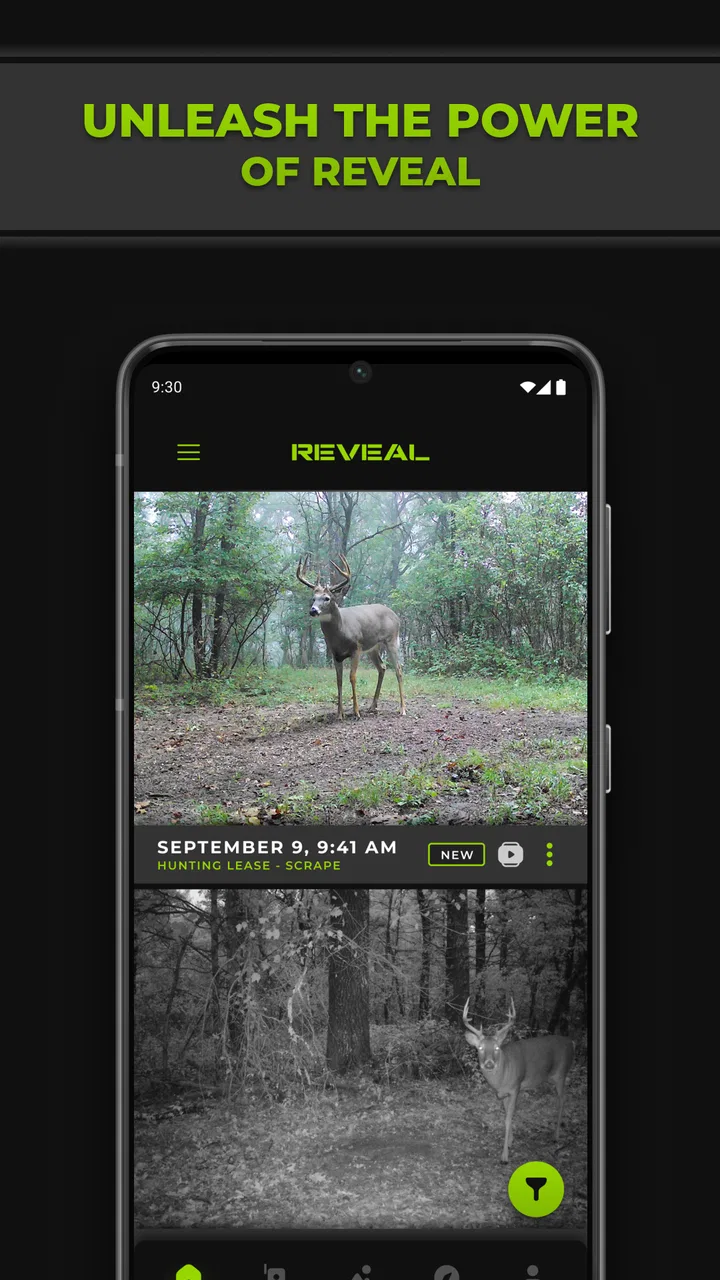
When the camera and network are cooperating, the experience is pleasantly direct. I do not need a separate photo-management routine just to see what the remote camera has been doing. The app gives the camera a mobile presence, which is exactly what I want from a companion app in this category.
I found it helpful to use the app as part of a checking routine rather than opening it randomly throughout the day. For example, I might review activity before leaving for a property, then use the result to decide what equipment or clothing to take. This prevents the app from becoming a stream of interruptions and makes the remote information more useful.
Another practical habit is to separate “interesting image” from “actionable image.” A photograph can be worth viewing without requiring a trip, while a pattern of activity may justify checking the camera position, battery situation, or surrounding area. The app supports that decision-making mindset because its value is not only in showing pictures; it helps me decide what deserves my time next.
I would not compare it directly with a normal phone camera app. A phone camera is better for taking, editing, and sharing photographs in the moment. REVEAL is better suited to receiving and reviewing material from a camera that is already installed somewhere else. If someone wants filters, creative controls, or a polished editing workspace, this is the wrong category of tool.
Using it away from home
The mobile context is where the app earns its place. I can check it from a vehicle before walking toward a property, from home while planning the day, or from another location when a physical camera visit would be inconvenient. That flexibility is more valuable than a long list of decorative options.
At the same time, I would avoid making important decisions from a single image. A remote camera view is only one angle and one moment. Weather, lighting, movement, and placement can all affect what appears in a photograph. I use the app to build context over time, not to assume that one frame tells the complete story.
For mobile use, a simple routine helps. I check the most recent activity first, then look for changes rather than repeatedly reviewing familiar images. If I am preparing for a visit, I note what the camera has shown and use that to guide the trip. This is more efficient than opening every image without a clear question in mind.
The app is also a better fit for users who already understand the practical side of cellular cameras. Someone new to this type of equipment may expect the phone application to handle every problem. In reality, camera placement, network availability, power, and the physical condition of the unit still matter. The app can make remote monitoring easier, but it cannot correct a camera that is badly positioned or unable to communicate.
What happens when something goes wrong
Connectivity failures are the part I would take most seriously before choosing this setup. If the camera is in a location where Verizon or AT&T service is inconsistent, the experience can become uncertain. A missing update may mean there was no new activity, but it may also mean the camera could not send what it captured. That ambiguity is an important limitation.
My preferred response is to avoid treating one quiet period as proof that nothing happened. I look for a pattern. If updates stop unexpectedly, I consider the camera location, its physical condition, and the mobile network before drawing conclusions. This is a more sensible recovery process than repeatedly refreshing the app and assuming the next attempt will fix everything.
When I plan a field visit, I also use the app as preparation rather than as the only source of truth. If recent information looks unusual or stops arriving, I treat that as a reason to inspect the setup when practical. A remote camera system still benefits from occasional physical checks, even when the app reduces the number of unnecessary trips.
This is where the app differs from a conventional camera roll. With local photographs, I know that the images exist on the device or storage medium when I inspect it. With a cellular camera companion, the path from capture to phone introduces uncertainty. The convenience is real, but it comes with a responsibility to understand what the connection can and cannot guarantee.
I also think recovery is easier when the user keeps the workflow simple. I would avoid changing several things at once after a problem appears. First I would confirm whether the issue is limited to the phone or seems related to the remote camera. Then I would check again later and plan an in-person inspection if the interruption continues. That method does not make the network more reliable, but it reduces guesswork.
Keeping mobile data use sensible
Because the app deals with camera activity away from the phone, I would use it thoughtfully on a mobile connection. Images can be more demanding than text, and repeatedly opening the app just to see whether anything changed is not an efficient habit. I prefer checking at deliberate times and reviewing what is relevant instead of browsing without a purpose.
That matters especially for people who monitor more than one location or who spend much of the day away from Wi-Fi. The app is free, which makes trying it easier, but the wider setup still involves a cellular camera and a supported network. Free access to the application should not be confused with a completely cost-free monitoring system.
I would also be careful when sharing the phone with someone else. A remote camera can show private land, familiar surroundings, or activity that is meaningful only to the owner. Before handing over access, I would consider whether the other person needs the entire view or only a particular image. The app’s usefulness makes the information convenient to reach, so ordinary privacy awareness becomes more important, not less.
A useful habit is to decide what question I am trying to answer before opening the app. Am I checking whether a visit is worthwhile? Looking for a change in activity? Confirming that the camera is still participating in the routine? That small pause helps reduce unnecessary browsing and makes the information easier to interpret.
Who will appreciate it most
I think this app is a strong match for owners of a compatible TACTACAM REVEAL cellular camera who want remote access to camera activity through a phone. It is especially appealing when the camera is placed far enough away that checking it manually is inconvenient, expensive in time, or disruptive to the area being observed.
It can also suit users who prefer a straightforward monitoring workflow over a broad photography toolkit. The app’s purpose is focused, and that focus is welcome when I only need to review what a remote camera has captured and decide what to do next.
The audience is narrower than the high rating might suggest. It has an average rating of 4.8 from around 25 thousand ratings, and that positive response makes sense for people whose camera and network arrangement fit the app’s purpose. It does not mean the same experience will suit someone who does not own the related hardware or who expects a standalone camera application.
I would skip it if I only want to take photographs with my phone, edit images, organize a personal gallery, or share creative work. A standard photography app would be more appropriate for those tasks. I would also hesitate if the intended camera location has unreliable service and there is no practical way to inspect the setup regularly. In that case, a local-storage approach may be less convenient but more predictable.
Setup expectations and compatibility
The store summary describes the app as connecting a TACTACAM REVEAL cellular camera using Verizon or AT&T to the REVEAL app. That makes compatibility the first question I would answer before installing it. The application is not presented as a universal companion for every trail camera, so owning a different camera brand or model may make it irrelevant.
The app is free and rated for Everyone, which lowers the barrier to trying it on an appropriate device. It supports Android 7.0 and later, so users with older Android phones should check that their operating system meets that requirement before planning around it. On a supported phone, the more important preparation is making sure the camera and its intended mobile network are suitable for the location.
The current version is 5.10.4, and the app was released on May 28, 2020. Those details are useful context for someone deciding whether this is an established companion rather than a brand-new experiment. I would still keep the app updated through the normal app-store process, because camera companions depend on communication between the phone software and the wider service.
Deer Management Systems has kept the product centered on the REVEAL camera experience rather than turning it into a general-purpose photography platform. I see that as a sensible design choice. The trade-off is that people looking for one app to manage many kinds of cameras will probably find the scope restrictive.
How it compares with ordinary camera alternatives
Compared with visiting a camera and removing its storage, the app offers speed and convenience. I can make a decision without first traveling to the location. That is the clearest reason to use it, and it is more meaningful than simply saying that the app is easy to navigate.
Compared with a typical phone gallery, it is less flexible as a photography workspace. I would not choose it for editing, composing, or creating polished albums. Its advantage is not creative control; it is the connection between a remote camera and the person responsible for checking it.
Compared with a camera that relies only on local storage, the app introduces network dependence but reduces unnecessary visits. Which option is better depends on the location. For a well-connected remote site, the cellular approach can transform the routine. For a difficult site with uncertain service, manual retrieval may offer clearer certainty even though it takes more effort.
That trade-off is why I would judge the app together with the camera placement rather than in isolation. The same application can feel highly convenient in one location and frustrating in another. The phone itself is only one part of the system.
My connectivity verdict
After using it as a remote-camera companion, I see Tactacam REVEAL as a focused tool that succeeds when its network-dependent design matches the user’s situation. It turns a distant camera into something I can check from a mobile device, helps me plan visits more intelligently, and avoids the need to treat every camera check as a physical errand.
Its limitations are equally clear. The experience depends on compatible TACTACAM REVEAL hardware, a supported Verizon or AT&T connection, and conditions that allow the camera to communicate. A quiet app does not always explain itself, so users need a sensible recovery routine and should not abandon occasional physical inspections.
With over 500 thousand installs, it is clearly reaching a substantial audience, but I would still recommend it selectively rather than universally. If you own the right camera and value remote awareness, the free app is a logical part of that setup. If you want a normal photography application or cannot rely on the intended cellular connection, another approach will serve you better.
My bottom line is simple: choose it for remote camera awareness, not for general photography. Used with realistic expectations, it can save time and make field decisions easier. Its real strength is the link between a camera in a distant place and a person checking in from a phone; its real weakness is that every part of that link has to cooperate.
FAQs for Tactacam REVEAL
01What is Tactacam REVEAL, and what is it used for?
Tactacam REVEAL is a companion app for Tactacam REVEAL cellular trail cameras. After pairing the camera with your account, the app lets you view and manage captured photos and videos remotely. It is mainly designed for wildlife monitoring, hunting property observation, and security around remote locations where checking the camera in person would be inconvenient.
02Does Tactacam REVEAL require a cellular plan or subscription?
Yes, the app depends on an active cellular service plan connected to a compatible REVEAL camera. The camera sends images through a mobile network rather than relying on Wi-Fi at the installation site. Available plans, data limits, activation requirements, and pricing can vary by region and camera model, so users should check the current options before purchasing or activating the device.
03Can I use Tactacam REVEAL without a compatible camera?
The app may be downloadable without owning a camera, but its main features are intended for users with a supported Tactacam REVEAL cellular camera. Without a paired and activated camera, there is little practical content to access. Compatibility can differ between models and software versions, so checking the official device list before downloading or buying hardware is recommended.
04What features does the Tactacam REVEAL app offer?
Tactacam REVEAL generally provides remote access to images and videos captured by connected cameras, along with camera management tools. Depending on the model and plan, users may be able to adjust settings, review activity, organize media, receive notifications, monitor battery or signal information, and manage multiple cameras from one account. Some features may require a paid plan.
05What should I do if the camera is not sending photos to the app?
If images are not appearing, first confirm that the camera is powered on, has sufficient battery, contains a properly formatted compatible memory card, and is located where the supported cellular network has coverage. Also check that the subscription is active and the camera is correctly linked to your account. Updating the app, restarting the camera, and reviewing its connection status can resolve common issues.
Pros
- Remote access lets you check cameras without visiting the site.
- Useful cellular connectivity for locations without Wi‑Fi.
- Supports multiple REVEAL cameras from one account.
- Photo and video management is convenient in the mobile app.
- Battery and signal information helps with maintenance planning.
Cons
- Cellular service and a compatible data plan are required for remote features.
- Coverage limitations can delay uploads or prevent camera communication.
- Frequent photo uploads may consume data quickly on some plans.
- Some advanced features may require a paid subscription.
- Initial camera setup can be confusing for first-time trail-camera users.

Tactacam REVEAL
Gallery